Showing posts with label fat tables. Show all posts

Wednesday, November 7, 2012

FAT/FAT16 tables - finding the data

Having successfully found the root directory on our sd card, we now need to start actually reading the data back from it. This is the last little link in a chain of
The easiest way to find a file is to load a filename into an 11-byte buffer. The easiest format to use is the name, padded with spaces plus the extension, minus the full-stop; so wav001.raw becomes wav001[space][space]raw. Or, perhaps more accurately, WAV001[space][space]RAW (since FAT16 likes to store filenames in uppercase).

A root directory entry looks like this:


  • The first eight bytes are the file name - FAT16/MSDOS only supported up to eight characters in a filename.
  • The next three bytes are the file extension
  • Then there's an attributes byte
  • Followed by time stamps for the file creation/modified date.
  • The next two bytes are the starting cluster for the data (note, cluster not sector)
  • The last four bytes are the total file length (in bytes)
  • Every root directory entry uses exactly 32 bytes
It's the first bunch of bytes we're interested in - the file name, starting cluster and total file length:
Now we just read the root directory, comparing the first 11 bytes of each 32-byte entry in the root directory to the bytes in our filename buffer and if they match, we've found the file we're interested in.

Once we've got our file, we need to work out the file-length (in bytes) and the starting sector for the first cluster of data.

Byte 26 of 32 is the least-significant byte of a two-byte word  (e.g. 0x02)
Byte 27 of 32 is the most-significant byte of a two-byte word (e.g. 0x00)
The starting cluster for the file in this example is therefore 0x0002

Bytes 28-31 represent the file length, starting with the least significant byte of a 4-byte value.
In this example:
Byte 28 = 0x43
Byte 29 = 0x5e
Byte 30 = 0x09
Byte 31 = 0x00

The total file length is 0x00095e43 which in decimal works out as 613,955
Looking at the file wav003.raw in Windows Explorer confirms that the file is, indeed, 613,955 bytes in size


Now previously, we worked out a whole heap of important things from our MBR (master boot record) including where the actual data started, and the number of sectors per cluster (in a FAT16 formatted disk, this is usually 32 sectors per cluster, making each cluster 16kb)

If we know which sector the actual data begins from, and which cluster to begin reading from, we can calculate at which sector the cluster begins.


unsigned long clusterToSector(unsigned long cluster){
     // a cluster is a complicated thing:
     // first there's an ofset to the master boot record
     // then some reserved sectors
     // then a fat table (maybe two)
     // then the root directory (fixed length)
     // THEN there's the first data block,
     // which is where we start reading our clusters from
     // BUT there's a catch - clusters start from zero not 2
     // so whichever cluster number we've been given, subtract 2
     
     unsigned il;
     il=cluster-2;
     il=il*sectorsPerCluster;
     il=il+dataStart;
     return(il);     
}


Great stuff!
Convert the cluster number (in this case, cluster 0x0002) into a sector (in this case, because clusters start from 2 - it's an anomaly of the FAT16 format - our first cluster is also the first sector where the data starts. We've already calculated this value)

"The actual data starts at sector 615 + 32 = 647"

If we jump to sector 647 and start reading back the data, we find that there is, indeed, data in there!
But with a file that's 613,955 bytes long, it's not all going to fit into a single cluster (one cluster is 32 sectors and each sector is 512 bytes, so that's only 32x512 = 16,384 bytes - 16kb)

So where's the rest of the data?
That's where the FAT table comes in!

Firstly, take the cluster number and double it. That's the same as bit-shifting the entire value one place to the left. In our example, our starting cluster was 0x02 so we double this and end up with 0x04
This tells us where in our FAT table to find the next (two-byte) cluster number.

Since the FAT tables themselves are written across a number of sectors, we need to convert this cluster_doubled value into a sector and byte offset, to read the actual "next cluster value" back.

Divide the cluster_doubled value by 512 to get the sector number
The remainder is the byte offset.
In our example, this gives us sectors zero, byte offset 4
So we want the first sector (sector zero) in our FAT table, fourth and fifth byte

Since the FAT table begins at sector 143, we add zero to this, open the sector (using our earlier functions) and read back all 512 bytes. When we get byte four, this makes up the least significant byte of a two-byte (16-bit) value. Byte five is the most significant byte.

In fact, when we open our sd card, read back bytes four and five from sector 143, we get
Byte 4 = 0x03
Byte 5 = 0x00

This tells us that the file continues at cluster 0x0003.
Using the same technique, we open and read the data from cluster 0x0003 (sector 647 + (3-2)*sectorsPerCluster = 647 + 32 = 679)

We continue reading data from the sector(s) and calculating the next cluster where the file continues until we've either read back the entire file (total bytes read > file size in bytes) or the FAT table returns 0xFF as the next cluster (this is a special response to say "no more clusters for this file").

This is summarised in the following function (remove comments around UART calls to see what the microcontroller is actually doing when calculating next FAT clusters).


unsigned char openNextBlock(){
     unsigned short iFATSector;
     unsigned short iFATBytes;
     unsigned short iy;
     unsigned short ix;
     
     //UARTPrintLn("opening next block of data");
     
     // the cluster_number_doubled is the location in the FAT table
     // where we can find the next block of data. If this entry is 0xFF
     // it means that there's no more blocks of data, otherwise the entry
     // is the next cluster where the file continues from
     
     iFATBytes=nextFatClusterDoubled & 511;
     iFATSector=nextFatClusterDoubled>>9;
     iFATSector=iFATSector+FATStart;
     
     //UARTPrintLn("look up next cluster in FAT ");
     //UARTPrint("sector ");
     //UARTPrintNumber(iFATSector);
     //UARTPrint(" byte offset ");
     //UARTPrintNumber(iFATBytes);
     //UARTPrintLn(" ");
     
     // check the FAT tables for the next cluster for the current file
     r=sdReadBlock(iFATSector);
     for(iy=0; iy < 512; iy++){
          r=readByte();
          if(iy==iFATBytes){ix=r; nextFatCluster=ix;}
          if(iy==(iFATBytes+1)){ix=r; ix=ix<<8; nextFatCluster=nextFatCluster+ix;}
     } 
          
     // close the currently open sector
     sdSecReadStop();

     nextFatClusterDoubled=nextFatCluster<<1; // this is the same as multiplying by two!


     //UARTPrint("next FAT cluster ");
     //UARTPrintNumber(nextFatCluster);
     //UARTPrintLn(" ");          
     
     if(nextFatCluster==0xFFFF){          
          // if we're at the end of the block, send the end of block marker
          //UARTPrintLn("no futher fat clusters to follow");
          return(0xFF);
     }else{
          
          // open the next sector
          iSector=clusterToSector(nextFatCluster);
          sectorCount=0;
          //UARTPrint("file continues at sector ");
          //UARTPrintNumber(iSector);
          //UARTPrintLn(" ");
          
          return(0);
     }
}


Friday, November 2, 2012

Understanding FAT tables

While it's possible to simply read and write data to and from our SD card serially (treating the card as one big eeprom chip) the most useful way to use the card is to format it using FAT16.
This will allow the card to be removed from the microcontroller and the data either read back or written to using a PC. This is far more useful that having to use some dedicated hardware to stream read/write data to/from the card and report it's finding back over UART/serial.

FAT is quite a complicated structure and needs careful understanding; it's very easy to get lost and end up reading chunks of data from the wrong sector and mangling files - especially if files on the card are frequently added or deleted and the files end up fragmented (i.e. written over a number of non-consecutive sectors).

To get started, download a hex editor (we used HxD) and format your sd card to FAT or FAT16 (not FAT32) format.


Here's your first gotcha:
When you mount an sd card into a hex editor to view the entire file contents, the hex editor usually starts from the LBA (logical block address). It will often call this sector zero.
But on the SD card, this may not actually be physical sector zero. If you use the previous card reading functions and write out the contents of sector zero over serial, you'll see it doesn't look like a boot record - it's mostly zeros. Sector zero usually just contains information about where you'll find the actual master boot record (and where the hex editor will call sector zero).

We found the easiest thing to do was use the UART tool on the PicKit2 software to view the serial data as it was read back from the sd card. We used the "save to disk" option and then read through the file after it had been saved as a text file. You can use whichever serial-based tools you're happy with for debugging at this point:


The last two bytes of the entire sector were 0x55 and 0xAA
This is the FAT signature to say that we're reading a FAT-formatted drive. We just double-checked that our code was working and actually reading back sensible data by looking for this signature at the end of the sector-ful of data.

Most of our sector zero data was zero - 0x00.
Having read up a little about FAT tables and file layouts, we were expecting a bit more than this - we were told to expect things like the OS name/type, volume label and so on, but nothing here looked anything like it. But that's because we weren't looking at "logical sector zero" - the first sector in the file structure - we were looking at physical sector zero.

So our first job was to find the logical block address LBA.
In amongst all the zeros, there was a little bit of data, starting at byte 447.
This is the data describing the actual drive itself - sectors, clusters, heads and cylinders (used in older drives). The data we're after is the two bytes at 454 (0x1C6) and 455 (0x1C7).
This is the sector number containing our master boot record MBR.

Another gotcha coming up - where data is written using two or more bytes, the order of bytes is back-to-front to what you'd expect: the least significant byte comes first. So in our example, we've got 0x87 followed by 0x00. But this actually translates to 0x0087.

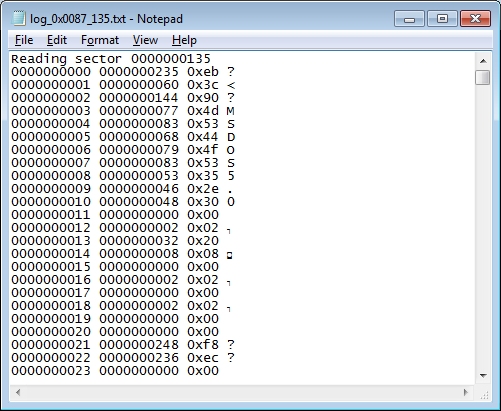
Using the same routines as we did for reading sector zero, we get the PIC to read back the contents of sector 0x87 (135 decimal).


Straight away we can see that this has some useful information. Already, we can see the name MSDOS5.0 being spelled out. So what about all the other junk in there? Here's how the boot record is laid out:

  • Jump instruction (3 bytes)
  • Operating system (8 bytes)
  • Bytes per sector (2 bytes)
  • Sectors per cluster (1 byte)
  • Number of reserved sectors (2 bytes)
  • Number of file allocation tables (1 byte)
  • Max number of possible root entries (2 bytes)
  • Small sectors (2 bytes)
  • Media type (1 byte)
  • Sectors per file allocation table (2 bytes)
  • More stuff we're not particularly interested in

The bits of information we're interested in are the bytes per sector (11 bytes into the record), sectors per cluster (13 bytes in) number of reserved sectors (14 bytes in) number of FAT tables (16 bytes in) the maximum possible number of entries in the root directory (17 bytes in) and the number of sectors used by each FAT table (22 bytes into the record).

Looking at our log files, we find entries 11 and 12 are 0x00 and 0x02 respectively.
But we have to remember that data is stored back-to-front, so the bytes per sector value is actually 0x0200 which is 512 in decimal. This looks like a sensible value so we can assume we're correctly reading the data back.

Sectors per cluster (a single byte) returns 0x20 which in decimal is 32. Again, a sensible-looking value and one we'd expect (32 sectors of 512 bytes = 16kb per sector, which is the FAT16 standard).

Number of reserved sectors is important for us to work out where the FAT tables and data actually reside on the card. Reading bytes 14 and 15 we get the (don't forget to flip them around) value of 0x0008 - i.e. there are eight reserved sectors following this boot record.

Usually FAT tables are duplicated to help provide a means of data recovery should one table become corrupted. Although very few people ever use the second table (and in fact, should either of the tables become corrupt, the host machine should stop reading/writing to the sd card and report a FAT mismatch error) it still takes up space and needs to be accounted for when working out where the data starts on the disk. Byte 16 is 0x02 - ie the FAT table is duplicated once; there are two working copies of the FAT system on our card - again, the expected value.

Maximum possible number of entries in the root directory is important - we can work out where the root directory is, and the data is stored immediately after it, so we need to know how many sectors the root directory takes up. Bytes 17 and 18 tell us that the max number of records in our root directory is 0x0200 or 512 in decimal.

The number of sectors used by each FAT table is in bytes 22 and 23.
In our case, we have the value 0x00ec or 236 in decimal.

From all this information we can deduce:

  • Our boot record is at sector 135 (in your hex editor, this is sector zero)
  • After 8 reserved sectors, the FAT tables begin at physical sector 143 (in your hex editor, these would start at sector 8 - we're going to stick with physical sectors to avoid confusion, but be aware that your sectors will be offset in the hex editor)
  • Each FAT table is 236 sectors in size
  • There are two FAT tables
  • Our root directory starts at sector 135 + 8 + (2*236) = 615
  • The root directory can hold up to 512 entries. Since this is FAT16 (each entry uses 16 bytes) this means our root directory takes up 512/16 = 32 sectors
  • The actual data starts at sector 615 + 32 = 647


Our SD card already contains a few files.
Since we're going to (eventually) be playing audio, we put some RAW audio data on there (files imaginatively called wav001.raw, wav002.raw etc.) and a short text file called FAT16.txt


From our deductions, we run our "read-sector" routines on sector 615 and see what we get:
(your card may have different offset values for the boot record, reserved sectors, FAT table sizes etc, so use the equations above, but substitute with your card's values to get the actual sector to read from - your card may not have the root directory starting at sector 615. In fact, we're not sure that ours does yet.....)


Holy cow Batman, it looks like we've found our root directory........